[1]:
%pylab inline
Populating the interactive namespace from numpy and matplotlib
VASP - Equation of State (EOS)
Running strucscan
In this example, we want to introduce how to perform VASP calculations using strucscan and perform a Murnaghan equation of state calculation in fcc Al. This examples requires two prerequisites: * a licensed VASP version * a configured resource directory including the necessary POTCAR for Al
In the documentation, it is explained how to set up the resource directory for VASP. We will also need a settings template. For this, you can stick to the default one that comes with the repository. We will perform a spin-polarised calculation with an energy cut-off of 500 eV:
[2]:
! cat ../resources/engines/vasp/settings/500_SP.incar
! ISIF and IBRION flags will be set automatically by strucscan
ALGO            = Fast
PREC            = Accurate
EDIFF           = 1e-05
NSW             = 100
NELM            = 60
LREAL           = .FALSE.
LWAVE           = .FALSE.
ISPIN           = 2
LCHARG          = .FALSE.
LORBIT          = 11
ENCUT           = 500
The structure
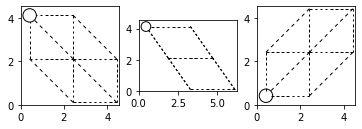
For our calculation, we will use a 1-atom ideal fcc structure:
[3]:
from ase.visualize.plot import plot_atoms
from ase import io

structname = "../structures/unaries/bulk/fcc.cfg"
atoms = io.read(structname, format="cfg")

fig, axs = plt.subplots(1, 3, figsize=(6,7))
for ind, rotation in enumerate(['90x,90y', '90x,45y', '0x']):
    plot_atoms(atoms, rotation=(rotation), ax=axs[ind])
plt.show()
The input dictionary
As a next step, we need to define our input dictionary. Let’s start from scratch with the mandatory keys needed for VASP:
[4]:
from strucscan.resources.inputyaml import *
VASP().MANDATORY
[4]:
{'species': 'str',
 'engine': 'str',
 'machine': 'str',
 'ncores': 'str',
 'nnodes': 'str',
 'queuename': 'str',
 'potential': 'str',
 'properties': 'str',
 'prototypes': 'str',
 'settings': 'str',
 'magnetic configuration': 'str',
 'initial magnetic moments': 'str'}
We need to set each value by ourselves. We will set the verbose tag to True to have some more insight.
[5]:
input_dict = {'species': 'Al',
              'engine': 'VASP 5.4',
              'machine': 'example_vasp',
              'ncores': '1',
              'nnodes': '1',
              'queuename': 'none',
              'potential': 'PBE',
              'properties': 'eos',
              'prototypes': 'fcc.cfg',
              'settings': '500_SP.incar',
              'magnetic configuration': 'SP',
              'initial magnetic moments': '2.0',
              'verbose': True
             }
Please note that might want to adapt the machine conifg.yaml to the machine on which you are running VASP. In this example, the config.yaml looks the following:
[6]:
from pprint import pprint
import yaml
with open("../resources/machineconfig/example_vasp/config.yaml", "r") as stream:
        config = yaml.safe_load(stream)
pprint(config)
{'VASP': {'serial': 'module load vasp/5.4.4\nvasp_std\n'},
 'scheduler': 'noqueue',
 'smallest queue': None}
Running strucscan
We are now ready to run strucscan. Let’s hand over our input to it:
[7]:
from strucscan.core.jobmanager import JobManager

JobManager(input_dict)
Data tree path:                /home/users/pietki8q/git/strucscan-master/data
Structure repository:          /home/users/pietki8q/git/strucscan-master/structures
Resource repository:           /home/users/pietki8q/git/strucscan-master/resources

Optional key 'initial atvolume' not provided. Default value will be used: default
Optional key 'monitor' not provided. Default value will be used: True
Optional key 'submit' not provided. Default value will be used: True
Optional key 'collect' not provided. Default value will be used: True
Optional key 'kdens' not provided. Default value will be used: 0.15
Optional key 'kmesh' not provided. Default value will be used: Monkhorst-pack
Optional key 'k points file' not provided. Default value will be used: (None)


key:                           : your input                                         what strucscan reads
----------------------------------------------------------------------------------------------------
species                        : Al                                                 Al
engine                         : VASP 5.4                                           VASP 5.4
machine                        : example_vasp                                       example_vasp
ncores                         : 1                                                  1
nnodes                         : 1                                                  1
queuename                      : none                                               none
potential                      : PBE                                                PBE
properties                     : eos                                                eos_atomic
prototypes                     : fcc.cfg                                            fcc.cfg
settings                       : 500_SP.incar                                       500_SP.incar
magnetic configuration         : SP                                                 SP
initial magnetic moments       : 2.0                                                2.0
verbose                        : True                                               True
initial atvolume               : (not set)                                          default
monitor                        : (not set)                                          True
submit                         : (not set)                                          True
collect                        : (not set)                                          True
kdens                          : (not set)                                          0.15
kmesh                          : (not set)                                          Monkhorst-pack
k points file                  : (not set)                                          (not set)

>> Initializing:
Initialized  Al atomic
Initialized  Al eos_atomic

2 jobs in JobList:
------------------------------------------------------------------------------------------------------------------
  #: jobpath                                                       prototype path
------------------------------------------------------------------------------------------------------------------
  0: VASP_5_4__500_kdens_0_150_SP_PBE/Al/eos_atomic__fcc__Al       VASP_5_4__500_kdens_0_150_SP_PBE/Al/atomic__fcc__Al/OUTCAR.gz
  1: VASP_5_4__500_kdens_0_150_SP_PBE/Al/atomic__fcc__Al

  #: jobpath                                                      id       status   start                end
------------------------------------------------------------------------------------------------------------------
  0 VASP_5_4__500_kdens_0_150_SP_PBE/Al/eos_atomic__fcc__Al      None     does not exist
  1 VASP_5_4__500_kdens_0_150_SP_PBE/Al/atomic__fcc__Al          None     does not exist


>> Entering loop:
Submitted: atomic__fcc__Al
  #: jobpath                                                      id       status   start                end
------------------------------------------------------------------------------------------------------------------
  0 VASP_5_4__500_kdens_0_150_SP_PBE/Al/eos_atomic__fcc__Al      None     does not exist

  1 VASP_5_4__500_kdens_0_150_SP_PBE/Al/atomic__fcc__Al          None     finished                      06/22/2022 10:05


Submitted: eos_atomic__fcc__Al
  #: jobpath                                                      id       status   start                end
------------------------------------------------------------------------------------------------------------------
  0 VASP_5_4__500_kdens_0_150_SP_PBE/Al/eos_atomic__fcc__Al      None     finished                      06/22/2022 10:14

  1 VASP_5_4__500_kdens_0_150_SP_PBE/Al/atomic__fcc__Al          None     finished                      06/22/2022 10:05


Finished.
[7]:
<strucscan.core.jobmanager.JobManager at 0x7f555e1cd710>
[9]:
import json

with open("../../VASP_5_4__500_kdens_0_150_SP_PBE__Al__output_dict.yaml") as stream:
    output_dict = json.load(stream)
    stream.close()

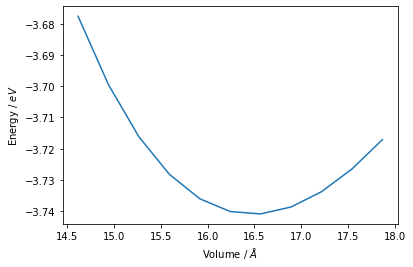
plt.plot(output_dict["eos_atomic__fcc__Al"]["volume"]['__ndarray__'][2],
         output_dict["eos_atomic__fcc__Al"]["energy"]['__ndarray__'][2])
plt.xlabel("Volume / $\AA$")
plt.ylabel("Energy / $eV$")
plt.show()
[ ]: